Automation with a brain
Stop checking things. Let AWO watch them for you.
Watch a page, a price, a chat channel or a schedule — let AI decide when something actually matters — then get a message where you already look. You build it by picking steps from a list. No code.
- Free forever, no card
- No account needed
- Runs on your computer
A workflow, start to finish
When this happens
Someone posts in my Discord channel
Ask the AI
“Is anyone asking about pricing?”
Only continue if
The answer was yes
Then do this
Send me a message on Telegram
Four steps, picked from a list. That is the whole thing.
Why most automation tools give up
Most of them give you a list of steps that runs top to bottom. That is fine until the job is a real one, and then three things break at once.
Two things should start the same job
A message arrives and a schedule fires. With a list you end up building the same thing twice and watching the two copies drift apart.
The answer should decide what happens next
“Is this urgent?” ought to pick one of three paths. A list can only do the next thing, so the choice gets buried where you cannot see it.
A busy channel costs a fortune
One AI call per message is fine at ten messages a day and painful at three hundred an hour — most of them not worth a call at all.
How it works
Three things, and none of them is code
You say what starts it, what to think about, and what to do. AWO handles the rest — including working out which steps a given event actually needs.
Pick what starts it
A Discord or Telegram message, a page that changed, a price, a webhook, or just a time of day. You can have several, all feeding the same workflow.
Say what to think about
Write the question in plain English — “is anyone asking about pricing?” — and add a check so you are only told when it matters.
Choose where to be told
Discord, Slack, Telegram, email, or anywhere else you already look. Press Test run and watch it happen.
Try it yourself
Three things can start this workflow. Watch how each one runs only the steps it needs — press a button to take over.
Nothing has run yet — pick an input above.
The building blocks
Nine kinds of step. You pick them from a list and say what comes next — everything AWO does is some arrangement of these.
Inputs
Discord, Telegram, webhooks, live sockets, page changes, schedules, manual
Ask the AI
Any model, per workflow or per step. Reply as text or parsed JSON
Pull out data
A field from an event, or text matching a CSS selector
Only continue if…
Gate the branch on a real value
For each item
Fan out over a list, with ceilings on breadth and spend
Bring together
Merge branches and read what actually arrived
Send an alert
Discord, Slack, Telegram, email, database, any webhook
Run a command
Tests, builds, scripts. Off until you allow-list it
AI writes code
A coding agent in a sandbox, opening a PR. Off by default — and the basis of Autopilot
What people build with it
Forty-nine of these ship inside AWO as recipes. Choose one, answer three or four questions in your own words, press go. No code, no config file.
Qualify new leads
“Retail companies with 10+ staff, budget over $500 a month. Not students.” Good leads reach your team with a one-line summary; the rest never interrupt anyone.
your form→ask the AI→only if…→Slack / Discord
Freelance gigs that fit you
Your rate and your skills, applied to a job board — so you hear about the work worth your evening before fifty other people have applied.
job board→ask the AI→only if…→alert
Keep an eye on your competitors
Five pricing pages and changelogs read together, in one round-up of what actually changed — instead of five separate alerts to piece together.
5 pages→merge→ask the AI→one report
For software work
Project Autopilot
Point AWO at a repository and give it a goal. It drafts a plan of phases, shows you the plan before anything runs, then works it phase by phase — one pull request per phase, with your test suite as the gate.
How Autopilot works, in fullWhat batching saves you
A busy channel is where one run per message stops being affordable. Put your own numbers in — a model call is the unit of cost, so the saving is just how many calls stop happening.
One run per message
—
AI calls / day
Batched
—
AI calls / day
Fewer calls
—
at the same coverage
Saved / day
—
at $0.002 per call
Batching never runs less often than its own timer, so a quiet channel still delivers on the window. The arithmetic above accounts for that.
What a run tells you
Every step keeps what it was given, what it produced, how long it took, and why it ran. Open one.
When it goes wrong
The same failure, reported two ways. The first is what the machine knows. The second is what you need.
Error: action node "forward" (discord) failed: discord action
needs `content` text and/or an `embed` object in config
    at runAction (orchestrator.js:612:11)
    at WorkflowRunner.executeSubgraph (orchestrator.js:1104:24)
True, and it tells you what the code checked rather than what to do.
The Discord message could not be sent because it has no message text.
Open this step and fill in message text — either type it, or
reference an earlier step’s output like {{ ai.output }}.
And most never reach a run: AWO checks what it can while you are still configuring, so the mistake is caught before the model is ever called.
The thing itself
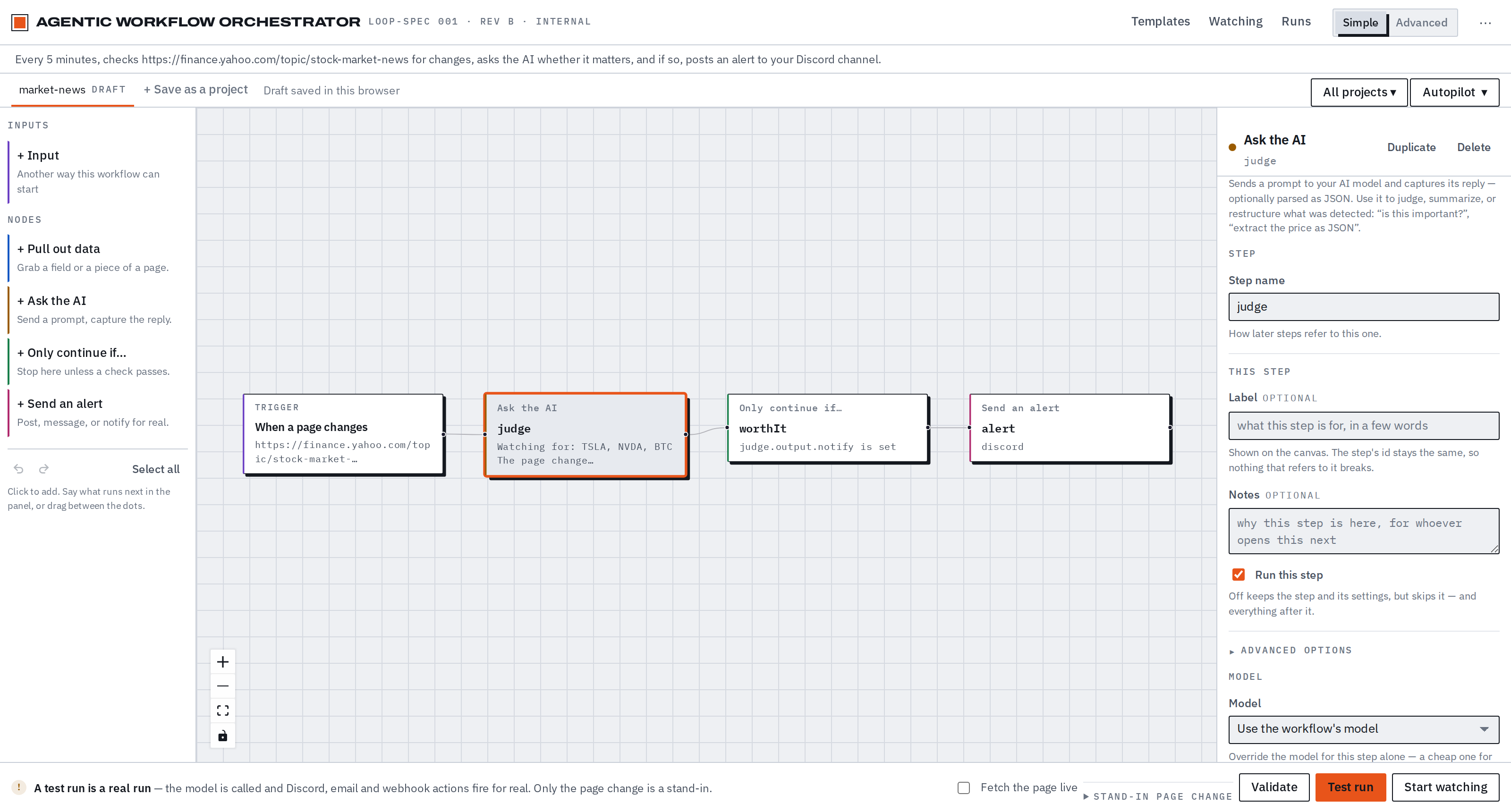
The builder, as it actually looks. Steps carry a coloured seam by kind, the canvas is the same document the CLI runs, and a test run lights up every step it touched.
How it compares
Only things that can be checked. No opinions about anyone else’s product.
| AWO | Hosted automation tools | Writing it yourself | |
|---|---|---|---|
| Runs on | Your machine | Their servers | Yours |
| Your data goes | Only where you send it | Through them | Only where you send it |
| Model | Any — local or cloud | Usually theirs | Any |
| Several inputs, one graph | Yes | Varies | If you build it |
| Cost at 10k events | Flat | Per task or per run | Your time |
| Works offline | Yes, licence included | No | Yes |
| You maintain | A workflow | Nothing | All of it |
What it will not do
No telemetry
AWO makes no call home, ever. Not for licensing, not for usage, not for crash reports. The only requests are the ones your workflow makes.
No account to run it
Download, unpack, run. An account here exists only so you can read back a licence key you bought.
Off by default
Shell commands, filesystem access, git writes and code-writing agents each need a separate, explicit opt-in. A workflow file can never enable them on its own.
Your workflows are files
Plain YAML on your disk, readable and version-controllable. Stop paying and they keep working within the free limits.
What it costs
The free tier is a real product, not a demo. You pay at the point you want a second input feeding one graph, or a second workflow running.
Free
$0 / forever
No account, no card, no time limit.
- One workflow, one input
- Every node type, any model
- Full run history and debugging
Pro
$20 / month
When one input stops being enough.
- Several inputs feeding one graph
- As many workflows running as you like
- Project Autopilot, Postgres, email support
Questions people actually ask
Do I need to be a developer?
No, and the recipes are there for exactly that reason: pick one, fill in two or three fields, press Test run. You never see YAML unless you want to.
You do need to choose an AI model — a free local one, or an account with a provider. That is the only setup, and the download page walks through it.
Where does it run?
On your machine. The Studio is a local web app at 127.0.0.1, nothing is hosted, and there is no account needed to run it. If you close the laptop, the workflow stops — put it on a server you control if you want it always on.
Which AI models does it work with?
Any of them. A local Ollama costs nothing and works offline; OpenAI, Anthropic and your own endpoint work too. You can set a model per workflow, or per step — a cheap one for classification, a strong one for the summary that gets published.
AWO ships no model and no keys, so the choice and the bill are yours.
What does it cost to run?
AWO itself is free for one workflow. The running cost is your model calls, and batching is the lever that controls them — the calculator above takes your own numbers.
Is my data sent anywhere?
No. AWO makes no call home — not for licensing, not for usage, not for crash reports. The only network requests are the ones your own workflow makes, to the places you configured. The full account is here.
How is this different from Zapier, n8n or Make?
Three things, all checkable: it runs on your machine rather than their servers, it uses any model including a local one, and several inputs can feed one graph with each running only the part it reaches. The comparison table sticks to facts and offers no opinion about anyone else's product.
What happens if I stop paying?
Your workflows stay on your disk as plain YAML and keep working within the free limits. Nothing is deleted and nothing is held hostage. A lapsed subscription also gets 14 days at the paid tier first, with a notice on screen, rather than stopping at midnight.
Is it open source?
No — AWO is proprietary, licensed and not sold, and the download contains the compiled product. Your workflows are a different matter: plain files that belong entirely to you.
Build your first workflow tonight
Free tier, no account, nothing sent anywhere. Unpack it and the Studio opens — a recipe gets you running in about a minute.